Using Kindle as weather display screen
In this post I'll explain how I turned my old Kindle to show the current weather in my area when its sleep
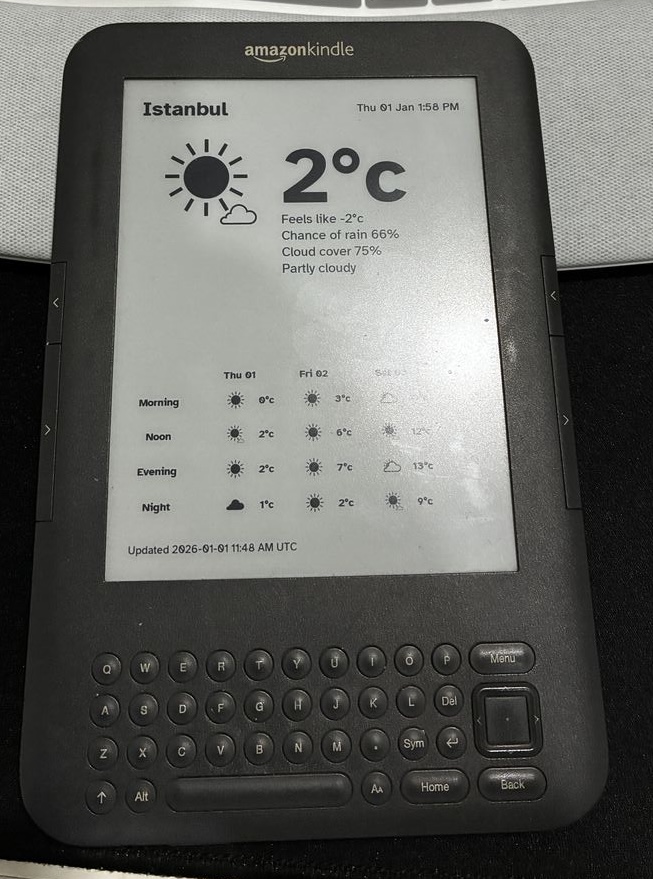
Before I continue writing, this post won't go into the jailbreak process, as this process differ from one device to another, but if you have a similar device, you can reach out and I can point out to the resources I used.
I've had this device since 2009 or 2010, so it has been with me for nearly 15y, and it had its ups and downs. Back when I got it, but when you are in Syria, such device won't work as it should, you will have to find ways around the sanctions to make it work for you.
Luckily, at that time I was somewhat known in the Arabic bloggers community, and a friend from KSA offered to give me his US address that I can add to my account so I can download the book I buy, which worked like a charm.
I am not going to go into the details of the sanctions, but lets just say we had our ways to go around them, and I am not ashamed of that 😅.
Fast forward, 2024 and the device has been setting without any use for the past few years, so reading topics about using the screen as a dashboard to show information was something I can utilize for this device, especially that it is still working, yes I take care of my devices too much I mean they cost me a lot.
Yesterday, I opened codex and with some going back and forth and some direction, codex ended up building a Python cli app that will pull the information from https://wttr.in based on the lang/lat for my location and generate an white/black image with 600x800 that I can use as my custom screensaver.
But still, we need to do another thing, we need to push this image to some place so that the kindle can pull it on an interval time. So we added another feature where we push the image to S3 compatible service, I am using R2 from cloudflare.
So for working from within Kindle I ended up writing a small shell script that will run every hour to pull the image and refresh the screensaver, at first I was rebooting the whole device then I found a script that is using the refresh command so I used it.
But you need to keep in mind that, you should deliver your image from HTTP server not https, since the openssl version that is used in this device is old, and to be honest I am not going to search for an update or a hack for it, thus I went with using Cloudflare worker instead.
There are many way to do this, but I went with the simplest and laziest solution, just proxy the request to my R2 using Cloudflare worker and return the image.
Kindle Setup
After you jailbreak your device, and login via ssh, you should
- make the rootfs writable since it will be mounted as read only
- add the cron to
/etc/crontab/root, and add something like0 * * * * /mnt/us/bin/launchto the end of the file - create a
bindirectory in/mnt/uswhere you will add the shell script, in my case I called itlaunch - make sure the file is executable, run chmod u+x
/mnt/us/bin/launch
Here is the full code for the file launch make sure to change the URL to your host
#! /bin/sh
URL="<YOUR URL>"
SCREENSAVER_FILE="/mnt/us/linkss/screensavers/00001_kindle-weather.png"
COUNT_FILE="/mnt/us/linkss/refresh_count"
FULL_REFRESH_INTERVAL=6
if curl -sI "$URL" | head -1 | grep -q "200"; then
  curl -s -o "$SCREENSAVER_FILE" "$URL"
  # Read current count (default to 0 if file doesn't exist)
  count=0
  [ -f "$COUNT_FILE" ] && count=$(cat "$COUNT_FILE")
  if [ "$count" -ge "$FULL_REFRESH_INTERVAL" ]; then
    # Full refresh to clear ghosting
    /usr/sbin/eips -f -g "$SCREENSAVER_FILE"
    count=0
  else
    # Partial refresh (no flash)
    /usr/sbin/eips -g "$SCREENSAVER_FILE"
    count=$((count + 1))
  fi
  echo "$count" > "$COUNT_FILE"
fi
I am not going to share the cloudflare proxy code as its not important, you can use your own host if you want.
Server Setup
On the server, since I already have docker I use crontab to run this docker image every hour at the 58min exactly, so that I can give 2 min difference between when I generate the image and when I pull it.
58 * * * * /snap/bin/docker rm -f k3w-screensaver >/dev/null 2>&1 || true; /snap/bin/docker run --rm --name k3w-screensaver --env-file /home/zaher/docker/k3w-weather/.env ghcr.io/zaherg/k3w-screensaver:main render --output /output/kindle-weather.png